How to Cancel a Wix Subscription: Refund Window, Domain and Your Site
To cancel a Wix subscription, open Premium Subscriptions in your Wix account, click the More Actions icon next to the plan, choose Cancel Plan, then confirm with Cancel Now. That stops the site plan from renewing. It does not cancel your domain, your business mailbox or any paid apps; each of those is a separate subscription and has to be cancelled on its own.
Timing decides the rest. Inside 14 days of a first-time plan purchase, cancelling gets you a full refund and ends the plan immediately. After 14 days there is no refund, and the plan runs to the end of the term you paid for. Everything below is from Wix's help centre as we read it on 9 Oct 2026.
The short answer: Premium Subscriptions, More Actions, Cancel Plan
- Sign in to Wix and go to Premium Subscriptions in your account.
- Find the plan you want to stop and click the More Actions icon beside it.
- Click Cancel Plan.
- Click Cancel Now to confirm.
Cancelling switches off auto-renewal for that plan. Wix notes that plans can renew up to three weeks before their expiry date, so a plan that "still has a month left" may be closer to its next charge than it looks. Your expiry date is shown on the Premium Subscriptions page, and past payment dates are in Billing History.
Changed your mind? Before the expiry date you can reactivate the plan by turning auto-renewal back on. After expiry, you would be buying again.
Before you click: the 14-day refund window, drawn
Wix's refund rule is short and strict. A first-time purchase of a Premium or Studio plan carries a 14-day money-back guarantee, and it applies to monthly and yearly plans alike. It does not apply to renewals or to upgrades of an existing plan. Domain purchases have no 14-day guarantee at all.
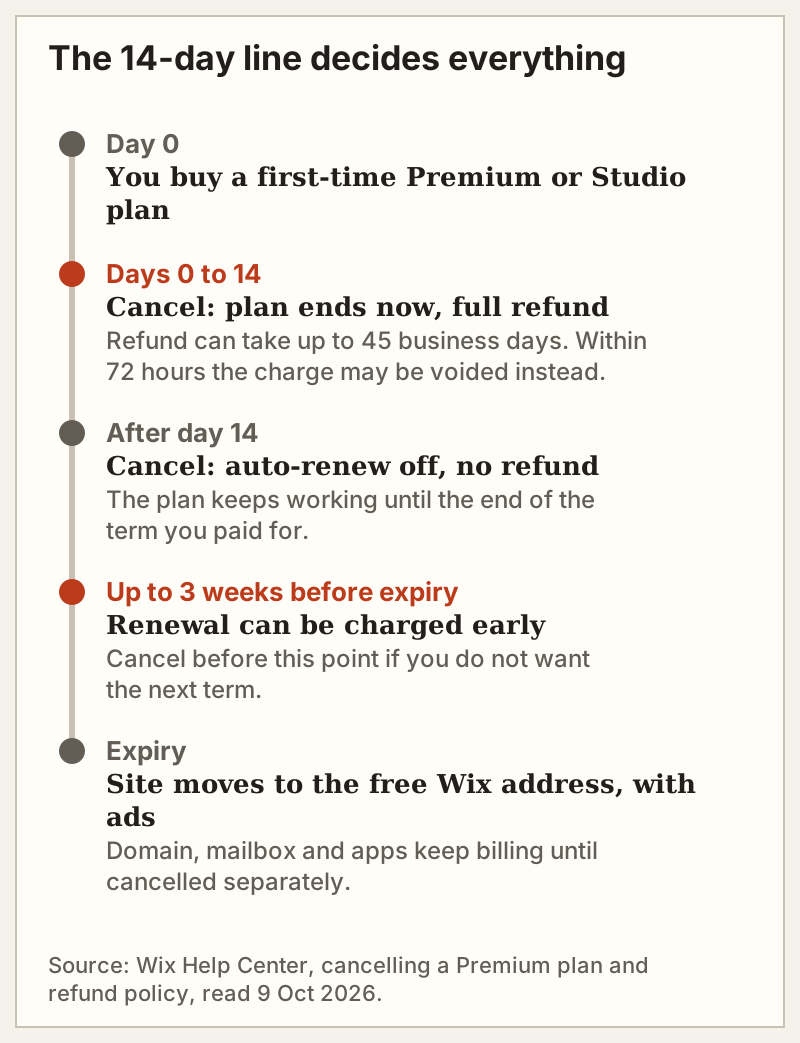
That creates a real choice that most guides skip. Cancel inside the window and you get your money back, but the plan ends the same day: custom domain connection, ad-free pages and paid features go with it. If you would rather keep using the time you paid for, Wix's own advice is to wait until the 14 days have passed and then cancel, so the plan simply runs out. You cannot have both the refund and the remaining term.
Two smaller timing details, both from Wix's refund policy page. Refunds can take up to 45 business days to process. And if you cancel within 72 hours of paying, Wix may void the transaction rather than refund it, in which case the pending charge drops off your statement within 20 business days; within 24 hours it may be voided entirely.
The domain, mailbox and apps cancel separately
This is the step that catches people a year later. Wix's help article is explicit: cancelling the site plan does not cancel domain, business email or app subscriptions.
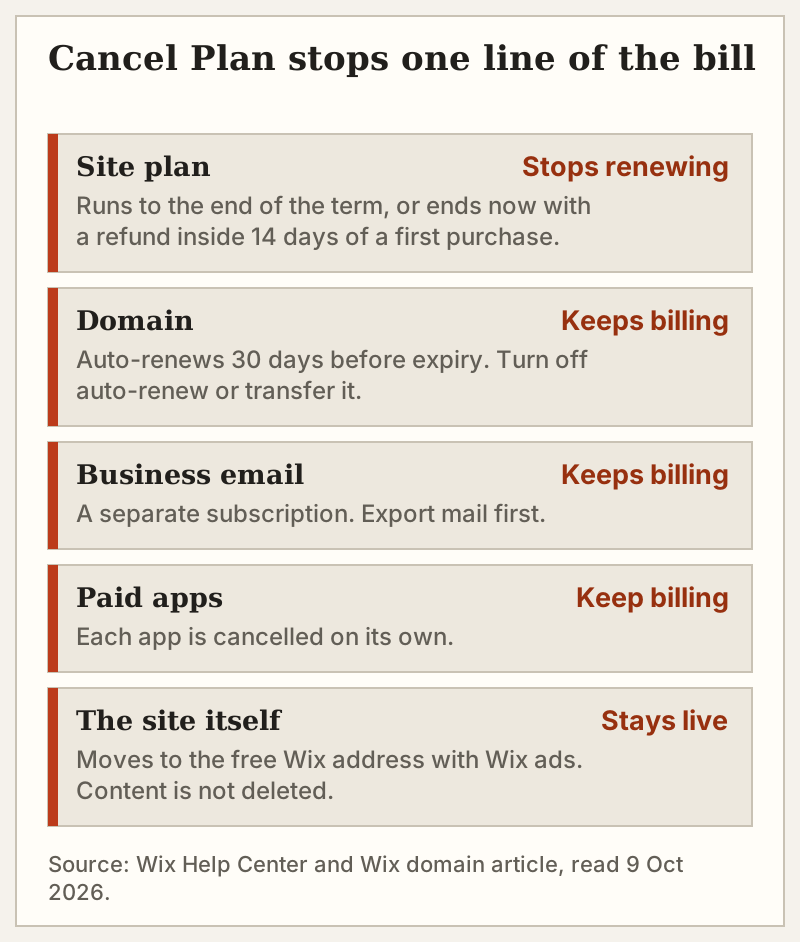
- The domain. Wix domains auto-renew by default, charging 30 days before expiry. To stop it, turn off auto-renew for the domain in your account, or transfer it to another registrar if you want to keep the name. A domain stays registered until it expires, and Wix describes a grace period of about 30 days afterwards in which it can still be renewed. A .com bought through Wix renews at $21.35 a year, per Wix's domain price list.
- Business email. Mailboxes bought through Wix are their own subscription. Export anything you need before you cancel.
- Apps. Each paid app from the Wix App Market bills on its own schedule and is cancelled on its own.
A practical habit: after cancelling the plan, open Billing & Payments from the account menu and read every remaining line. Anything still showing a renewal date will still charge.
What happens to your site after cancelling
When the plan ends, the site does not disappear. Per Wix, it stays live and viewable, its address switches to the free Wix URL, and Wix ads appear on it. The content is not deleted.
If you want it offline, cancelling is not enough. You need to unpublish the site or hide it from search results. If you want it gone entirely, Wix's order is to cancel (or unassign) the plan first and then move the site to the trash.
Two related options are worth knowing before you cancel at all. Unassigning a plan detaches it from one site so you can attach it to another, without cancelling anything. And Wix lets you change plan or switch billing cycle, which may solve a price problem more cheaply than leaving. Our Wix pricing breakdown shows what each tier costs on annual billing.
Refunds outside 14 days
After the window closes, Wix's position is plain: renewals and cancellations made after the 14-day period are not refundable. That includes the automatic renewal of a yearly plan you forgot about, which is why the three-week early-renewal note above matters. If a renewal has just gone through and you believe it is in error, contact Wix Customer Care rather than assuming a refund; the published policy gives no right to one.
Closing the Wix account entirely
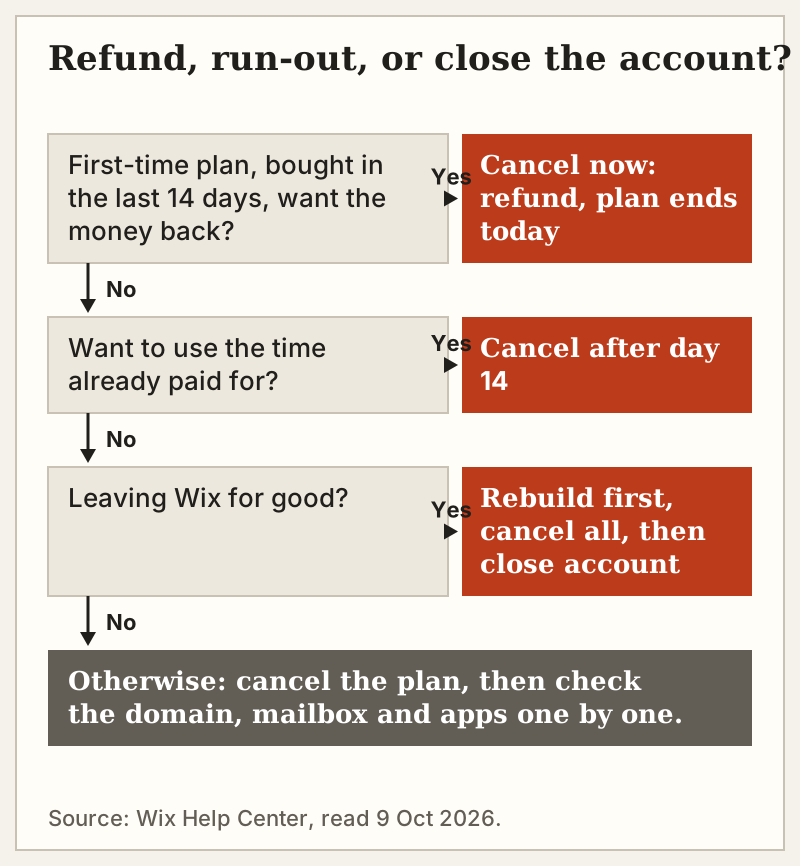
Cancelling a plan and closing an account are different acts. To keep a site on the free version, you only cancel the plan. To close the account, Wix requires you to clear it first:
- Cancel every premium subscription (site plan, domain, business email, apps), or transfer each to another Wix account, and pay any outstanding usage-based charges.
- Turn off auto-renew on each domain, or transfer it out, and remove any external domains still connected.
- Move each site to the trash, or transfer it to another Wix account to keep it running.
- Go to the account-closing page, choose a reason if you like, enter your password, click Close Account, then confirm with Close My Account.
Wix states that closing an account cannot be undone, and that you lose access to the account and everything in it. One trap: closing stops billing only for subscriptions in that account. If the same card pays for subscriptions in another Wix account, those keep running.
Cancelling vs leaving Wix
Cancelling stops the bill. It does not move your site anywhere, and Wix has no full-site export, so a site that will live on elsewhere needs to be rebuilt there before the Wix plan lapses. If that is your situation, our file on when to leave Wix sets out what can be exported and the order to do it in. The two destinations we see most are Squarespace for a calmer managed builder and WordPress for full ownership; settle that choice before you cancel, not after. Whether Wix was worth keeping at all is the question our full Wix review sets out to settle.
Edge cases
- Monthly plans. The 14-day guarantee covers a first-time monthly plan too. After that, cancelling stops the next monthly renewal.
- Upgrades. Moving from Light to Core is an upgrade, not a new purchase, so it is not covered by the 14-day refund.
- Plan bought with a free domain. Wix's refund page is silent on the fate of a voucher-funded domain when the plan is refunded. Ask Customer Care before you cancel if keeping the name matters.
- Studio plans. First-time Studio plan purchases carry the same 14-day guarantee as Premium plans.
Cross-examination: cancelling Wix
How do I cancel my Wix subscription?
Can I cancel a Wix subscription and get a refund?
Does my Wix site disappear when I cancel?
Will Wix refund my domain if I cancel?
Is cancelling a plan the same as closing my Wix account?
For the complete record — scores, pricing evidence and dissents — read the full Wix review and verdict for 2026, or see what Wix actually costs.