Can You Change Your Wix Template After Publishing? The Ruling and the Rebuild
No. Wix does not let you switch the template of a site you have already created, published or not. Its help centre says so in one line: it is "not possible to switch to a different template for a site you already created." The documented route is to start a new site on the template you want, carry your content across, then move your Premium plan and domain to the new site.
That answer surprises people because several pages ranking for this question describe a "change template" button. On Wix's own documentation, as we read it on 9 Oct 2026, there is no such button for an existing site. This ruling sets out the rebuild in Wix's order, lists what survives the move and what does not, and covers how to protect your search rankings on the way.
The ruling: no, not in place
A Wix template is not a skin laid over your content. Once you pick one, its layout, design and structure become the site itself, and you edit that site from then on. There is no setting that lifts your pages out and pours them into a different template.
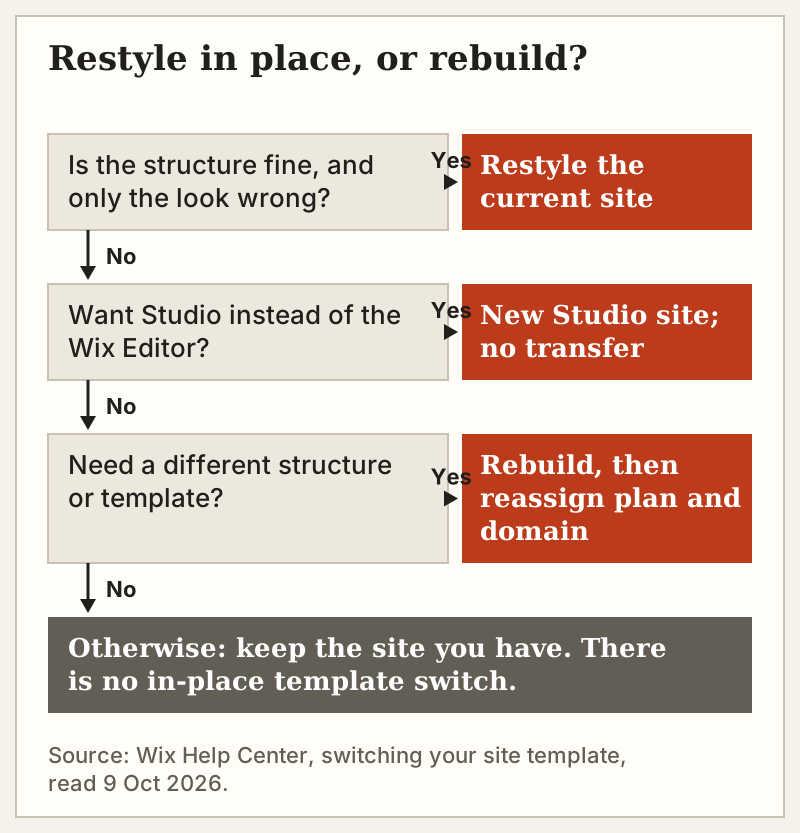
What you can do, with no new template at all, is change the site you have. Wix describes its editor as letting you customize everything from the site layout to visuals and content with drag and drop. New colours, new fonts, rearranged sections and replaced images are all edits to the current site. If what bothers you is the look rather than the bones, a restyle is a far smaller job and puts nothing at risk: your plan, domain, store and members stay exactly where they are.
So the first question is not "how do I switch templates" but "is a restyle enough?" If yes, stay where you are. If you need a fundamentally different structure, read on.
The rebuild route, step by step
Wix's help article lays out five steps. We have kept its order and added what each one means in practice.
- Choose your new template. Pick it from the Wix Editor or Studio Editor template library and create a new site with it. You can have as many sites in one account as you like, so the old one stays untouched while you work.
- Copy elements and pages from your old site. In the Wix Editor you can copy individual elements, and whole pages, into the new site, or save elements to My Designs and reuse them. In the Studio Editor you cannot copy entire pages; you save sections as design assets instead.
- Import your media. Bring images and files over from the Site Files folder in the Media Manager, rather than re-uploading them.
- Transfer the features that can move. Some Wix features can be carried across; most business data cannot (see the table below).
- Transfer your plan and domain. When the new site is ready, reassign your Premium plan and your domain to it. You do not buy either again.
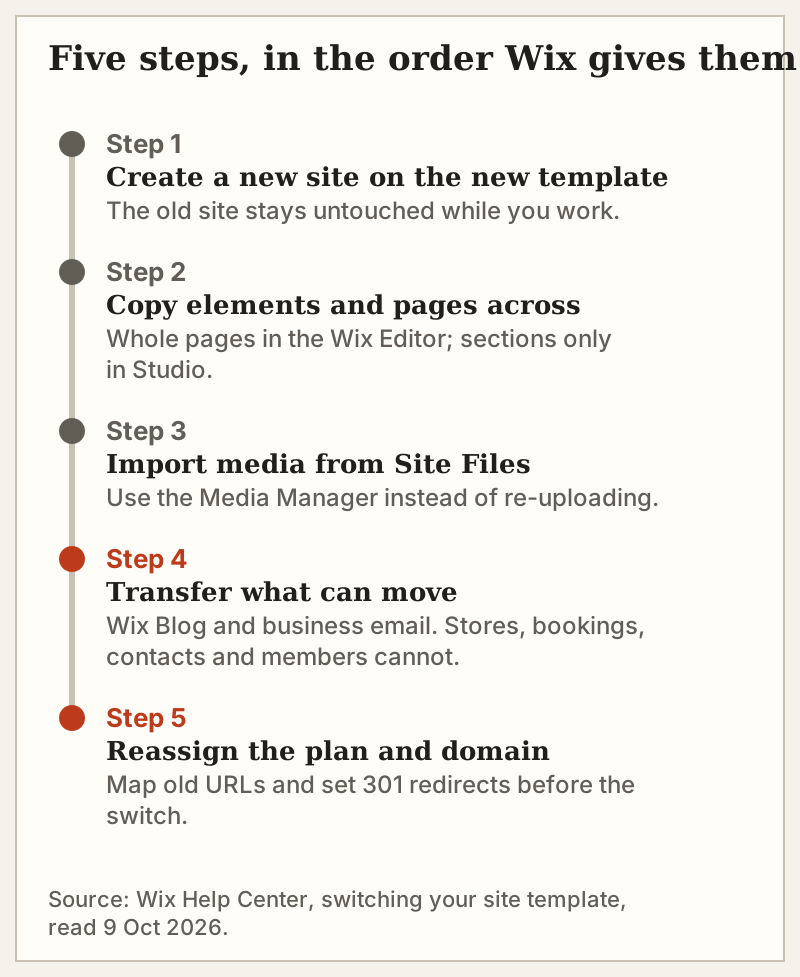
Keep the old site intact until step 5 is done and the new site is checked. Reassigning the plan is what makes the switch public, so everything before it can happen privately.
What carries over and what doesn't
This is the list that decides whether a rebuild is an afternoon or a project. Wix names two business features that can be transferred to the new site, business email and the Wix Blog, alongside the plan and domain themselves. Everything marked No in the table stays with the old site.
| Item | Moves to the new site? | How |
|---|---|---|
| Premium plan | Yes | Reassign the plan to the new site |
| Domain | Yes | Reassign the domain to the new site |
| Business email | Yes | Listed by Wix as transferable |
| Wix Blog | Yes | Listed by Wix as transferable |
| Pages and elements | Partly | Copy in the Wix Editor; sections only in Studio |
| Images and files | Yes | Import from Site Files in the Media Manager |
| Site theme, design and layout | No | Comes from the new template |
| Premium apps | No | Re-add on the new site |
| Contacts and site members | No | Not transferable |
| Wix Stores, Bookings, Invoices, Video | No | Not transferable |
| Wix Inbox, email marketing, marketing integrations | No | Not transferable |
| Wix Photography apps | No | Not transferable |
Read the second half carefully if you run a shop or a membership site. A Wix Stores catalogue, a Bookings calendar, a member list and the contacts behind your email campaigns do not move. For a brochure site, the rebuild is mostly copy and paste. For a trading business, it is closer to a migration, and the when to leave Wix file is worth reading before you decide the new site should be on Wix at all.
Protecting SEO: keep URLs, or redirect them
Search engines rank pages by address. When the domain moves to the new site, any page that keeps the same URL slug simply carries on. Any page whose address changes needs a 301 redirect from the old URL to the new one, which Wix's SEO settings support. Map the old addresses before you reassign the domain, not after, because the old site's URLs stop resolving to its pages the moment the domain points elsewhere.
A short checklist: list every live URL on the old site, give each page on the new site the same slug where you can, set 301s for the rest, and check Google Search Console for errors in the week after the switch. Our ruling on whether Wix is good for SEO covers what Wix does well on the technical side.
Editor, Studio and Harmony: the 2026 answer for each
Wix now sells more than one editor, and the answer depends on which one your site was built in.
- Wix Editor. No template switch. The rebuild above applies in full, including copying whole pages.
- Wix Studio. No template switch either, and page copying is limited to saving sections. Wix also states that Wix Editor and Studio Editor sites cannot be transferred between the two platforms, so switching editors always means starting a new site.
- Wix Harmony. Wix markets Harmony as a new hybrid website editor that mixes AI prompting with manual drag-and-drop design. Wix's template-switching article does not cover Harmony, so we cannot rule on it yet; check the Harmony help pages in your account before assuming either answer.
The practical lesson: pick the editor before you pick the template. Choosing a new template is the cheap decision. Choosing the platform underneath it is the one you cannot undo.
If you are rebuilding anyway
A rebuild is the one moment when switching builders costs no more than staying. If the reason for a new template is that you are fighting Wix's free-form canvas, it is fair to price the alternatives first. Squarespace runs four US plans from $19 to $99 a month billed annually, with Core at $29 and Plus at $49 in between (prices as of 9 Oct 2026); it offers a 14-day free trial and no free plan. If Wix is still the right venue, you already own the plan; the new site takes over once the plan and domain are reassigned and it is published, and Wix's plans page only comes into it if you are adding a second site. If you are unsure the platform deserves a second build, our Wix review gives the case for and against before you start.
Cross-examination: changing a Wix template
Can you change a Wix template after publishing?
How do I change my Wix template without losing content?
Do I need to buy a new Premium plan for the new site?
Will I lose my blog if I switch templates?
Can I move a Wix Editor site to Wix Studio?
For the complete record — scores, pricing evidence and dissents — read the full Wix review and verdict for 2026, or see what Wix actually costs.